Reservations diary
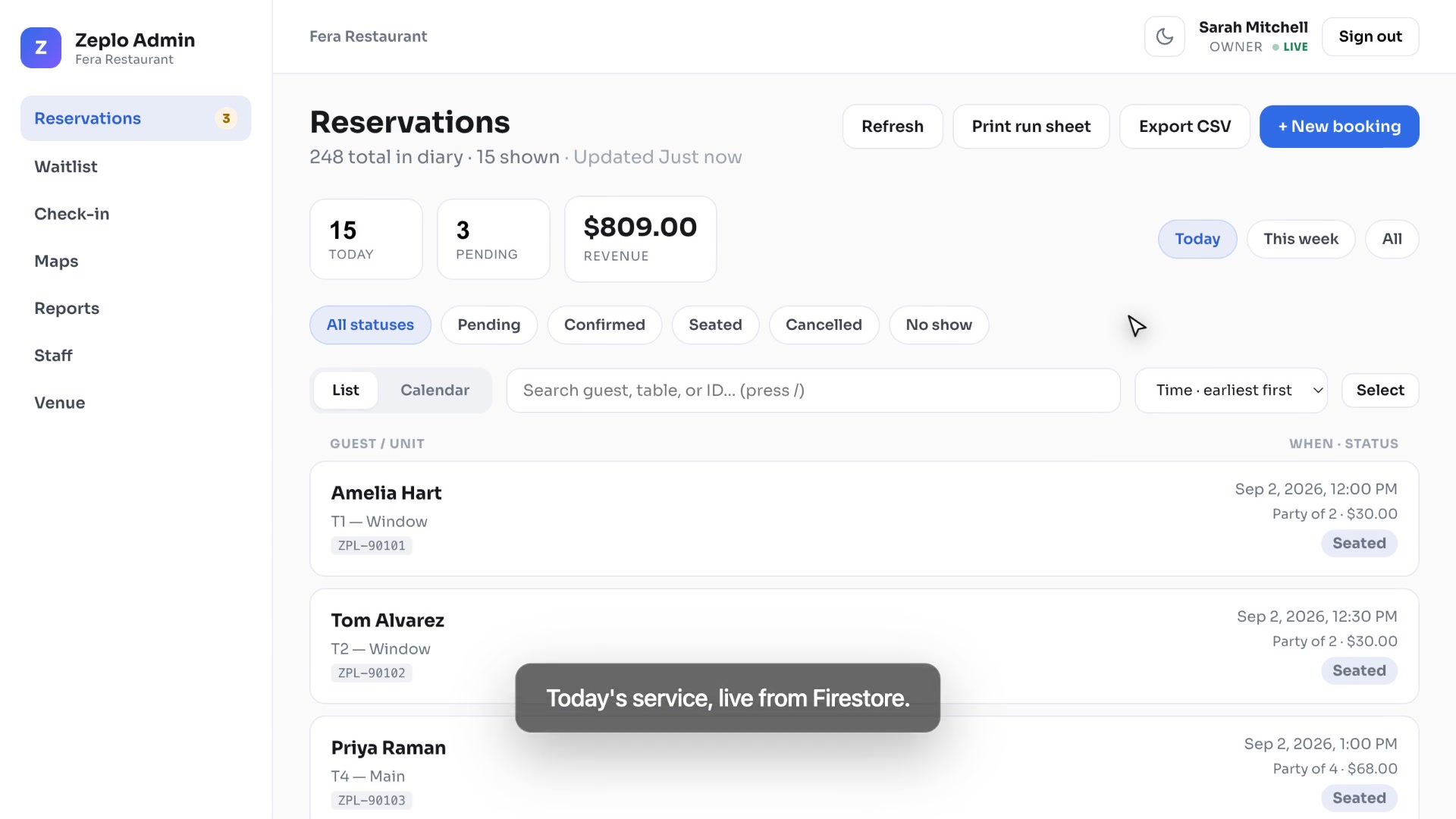
Today's operational view with list and week calendar tabs.
- Filter: today, this week, all
- Search by guest name, booking ID or unit
- Stat cards: count, pending, revenue
- Tap through to full reservation detail
WebKoding · Separate CodeCanyon item
Not a Flutter app — browser dashboard onlyZeplo Admin is a React web panel for restaurant hosts, cinema managers and venue owners. Your customers book on the Zeplo Flutter mobile app (or your own app). Staff run day-to-day operations here — reservations diary, walk-ins, QR check-in, floor maps, venue settings and team roles.
Live demo connects to a shared Firebase sandbox — use the demo operator accounts below.
Ninety seconds
Every frame is the panel on the live demo doing the thing the caption claims. Nothing is staged and nothing is sped up — including the beat that writes a confirmation straight to Firestore.
Product positioning
Zeplo Admin is sold separately from Zeplo mobile. Buyers who only need the customer app do not pay for the web panel. Buyers who need a front-desk screen on a Mac, iPad or PC buy this item and connect it to the same Firestore database.
Zeplo mobile — different licence
What your guests install. Discovery, unit selection, checkout, payments, loyalty and in-app operator mode on a phone.
bookings and venue data to venues/{id}This item — Zeplo Admin
What your staff open in Chrome or Safari at the reception desk. Large-screen diary, faster check-in, venue configuration.
Architecture
There is no HTTP bridge between the Flutter app and this panel. Both are Firebase clients. When a guest confirms a booking on mobile, a Firestore document appears; the web panel lists it seconds later.
Zeplo Flutter app (or your own app using the same schema) creates a document in the bookings collection and holds units in venues/{venueId}/units.
Authentication, security rules and indexes live in your Firebase project. Staff accounts are stored at venues/{venueId}/staff/{uid} with a role field.
Zeplo Admin signs in with Firebase Auth, loads today's diary, checks guests in via QR, creates walk-in bookings and updates statuses — all against the same data.
Included screens
The panel is not a skeleton — each screen is wired to mock data today and to
Firestore when you set VITE_DATA_SOURCE=firebase in production.
Today's operational view with list and week calendar tabs.
Single booking view for managers and owners.
Phone reservation or walk-in without the customer app.
Door workflow for hosts at peak hours.
Visual zones from your venue's unit layout.
venues/{id}/units — same data as mobile floor mapInvite operators and assign access levels (Firebase Auth UID + role).
StaffRoleRightsProfile and operating rules for your location.
The queue at the door, not just the bookings in the diary.
Seven, fourteen or thirty days of trading, plus who did what.
Built for a dim dining room and for keyboard-only operation.
The paper backup every service still needs.
Firebase Authentication in production; demo mode for preview.
Access control
Permissions match the Zeplo mobile admin module so you can mix phone and desktop without conflicting access rules.
| Capability | Owner | Manager | Host |
|---|---|---|---|
| View reservations diary | ✓ | ✓ | ✓ |
| Create walk-in booking | ✓ | ✓ | ✓ |
| QR / ID check-in | ✓ | ✓ | ✓ |
| Change status & refund | ✓ | ✓ | — |
| View floor maps | ✓ | ✓ | ✓ |
| Edit maps & venue | ✓ | ✓ | — |
| Export CSV | ✓ | ✓ | — |
| Manage staff accounts | ✓ | — | — |
Requirements
The live preview uses a shared Firebase sandbox with demo operator accounts.
Buyers can also run locally in mock mode (VITE_DATA_SOURCE=mock) with zero setup.
panel/).env.example)documentation/index.html)bookings, venues/{venueId},
venues/{venueId}/staff/{uid}, venues/{venueId}/units,
plus waitlist and activity for the door queue and audit log.
If you already run Zeplo mobile on Firebase, point this panel at the same project
and add staff accounts — no data migration.
VITE_DATA_SOURCE=firebase, add your Firebase web config, deploy Firestore
rules from the zip, and create staff documents for each operator.
Tech stack
Built for CodeCanyon buyers who want readable TypeScript, not a black-box bundle.
npm run build → static dist/VITE_BASE_PATHFAQ
No. Zeplo Admin is a web-only React project. The Flutter mobile app is a separate CodeCanyon item. This panel is for staff browsers, not app stores.
Yes, if your own customer app writes to the same Firestore schema. Zeplo Admin does not include a guest-facing app — you need something that creates bookings.
Yes. Sector differences live in unit labels and venue config from Firestore — the panel reads whatever Zeplo mobile (or your app) stored. Restaurant tables, cinema seats and beach loungers all appear as units.
No. One venue per panel instance. Multi-tenant marketplace is explicitly out of scope.
So reviewers and visitors can open every screen without creating Firebase users. Production buyers add their own staff documents.
Try it now
Runs on the live Firebase demo with venue Fera Restaurant. Use the demo accounts — changes persist until re-seeded.
URL: https://zeplo-admin.webkodingtheme.com/app/
On the login page, tap Fill on any role card — or use:
Try signing in as Host — Staff and Venue menu items disappear. Owner sees everything.